
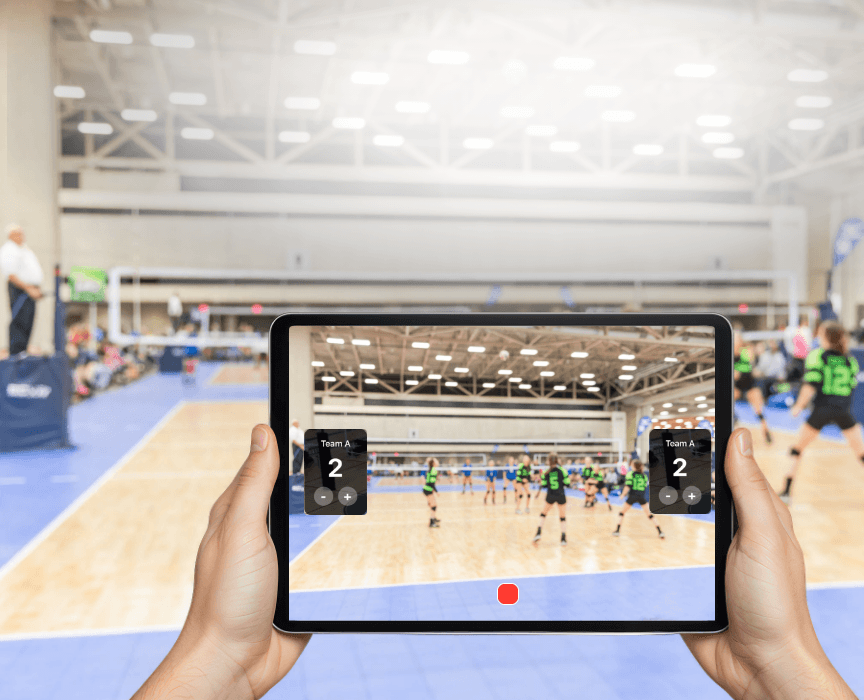
Volleyball match being recorded on iPhone with live score overlay using Varsity Score

Guide

Record a Volleyball Match
Score on the Video.

One free iPhone app. No editing. The live set score, team names, and current set number are burned directly into the recording while you play.

The simplest way to record a volleyball game with the score already on the video is Varsity Score, a free iPhone and iPad app. You mount your phone on a tripod, enter both team names, and tap once per rally point. The app records the game and keeps score simultaneously — the overlay shows the current set score, set number, and team names on every frame. When you stop recording, the finished video is in your Photos app ready to share. No editing, no separate scoreboard app, no account required.

01

What you need

One iPhone or iPad, a phone tripod, and the free Varsity Score app from the App Store. That is the entire kit. No extra hardware, no separate scoreboard, no WiFi.

A tripod is strongly recommended for games longer than a few minutes — holding a phone steady for 90 minutes of play is not realistic. A basic $15–20 flexible tripod with a phone mount works fine. If you have both an iPhone and an iPad, use the iPad on the tripod as the camera and your iPhone as a remote — more on that in step four.
02

Where to put the camera

Mount at one of the end-line corners, elevated 8 to 10 feet if the gym allows it — bleacher top row is ideal. You want to capture the full court in a single frame: the net should be visible, both sidelines should be in view, and you should be able to see the ball move from serve to pass to attack.

Avoid the side-line center position. It looks natural from the stands but the net cuts the court in half on video and you lose depth on attacks. The end-line corner gives you a broadcast-style diagonal angle that reads well on a phone screen. If you are stuck low on the sideline, frame wide enough to catch both teams — court context matters more than close-up ball detail for family viewers.

03

Set up the teams

Open Varsity Score, enter both team names, and choose team colors or logos. Keep names short — under about 10 characters reads cleanly on the overlay. The names appear on every frame of the recording.

Examples: use "Lincoln" not "Lincoln High School Volleyball". Use "West View" not "West View Unified District". The overlay is designed for readability at small sizes on a phone screen — longer names get truncated or crowded. You can update names between sets if needed, but setting them right before tip-off keeps things clean.

04

Scoring during the match — rally scoring

Tap once per rally point. In volleyball every rally scores — when the rally ends, one team gets a point regardless of who served. Tap the scoring team's side. The overlay updates on the video in about one second.

If you mounted an iPad on the tripod as your camera, pair it with your iPhone before the match. Varsity Score lets your iPhone remote-control the iPad recording — you can walk the sideline, talk to parents, and update scores from your pocket without ever touching the tripod. The iPad keeps recording with a steady frame. Score-only mode is also available if you only need to track the score without recording video — useful when battery or storage is low.

05

Between sets

When a set ends, tap New Set in the app. The set counter increments automatically and the point scores reset to 0-0. The recording continues — the full match lives in one video file.

You do not need to stop and restart the recording between sets. The overlay transitions are part of the live recording. If you are streaming, remote viewers see the set change in real time. The final video will show the natural flow of the match across all sets, with the overlay always reflecting the current set number and live score.

06

After the match

Tap stop. The finished video — score overlay already baked in — saves immediately to your Photos app. Share via AirDrop to players on the bench, send it in Messages, post it to YouTube, or just keep it in Photos. No editing required.

If you streamed the game, family members who watched live can still get the recording — share the video directly. The stream and the saved local file are independent; you always have the full HD recording on your device. For tournament weekends, the videos accumulate in Photos organized by date, making it straightforward to find any specific match later.

What the recording looks like

The score is already there.

Team names, set score, and current set number display on every frame in real time. No post-processing, no title cards, no explaining the score to anyone watching the clip later.

Download on the
App Store
Volleyball score overlay displayed on a Varsity Score recording — set score, team names, and set number visible

Common questions

Straight answers.

Do I need WiFi to record a volleyball game in the gym?
No. Varsity Score records completely offline. The video saves directly to your iPhone or iPad Photos app. Most school gyms have unreliable WiFi anyway — recording works the same whether you have a signal or not.
How do I record the game and keep score at the same time?
Varsity Score does both simultaneously. You tap once per rally point on your iPhone screen; the score overlay updates on the video in about one second. If you mount an iPad on a tripod as the camera, you can pair it with your iPhone and update scores from anywhere on the sideline — the iPad keeps recording while your phone acts as a remote control.
Can grandparents or family watch the game live?
Yes. Varsity Score includes one-tap live streaming. Family members watch on Twitch or Facebook from anywhere. The score overlay appears in the stream, so remote viewers see the same score display as if they were in the gym. You get a full local HD recording at the same time — the stream and the saved video are independent.
Is the score editing into the video afterwards?
No editing needed. The score overlay is burned directly into the recording in real time. When you stop recording, the finished video — with score, team names, and set number on screen — is already in your Photos app ready to share.
How much does Varsity Score cost?
Varsity Score is free to download from the App Store. There is no subscription, no account required, and no in-app purchases needed to access any of the recording and scoring features described in this guide.
What happens between sets?
Tap New Set in the app. The set counter increments and the point scores reset to 0-0. You keep recording through the full match — the set transitions are part of the same video file, and the overlay always shows the current set number alongside the live score.

Bring it to the next match.

Download Varsity Score for free, set up takes under two minutes, and the score is on the video from the first rally.

Free — iPhone & iPad — iOS 15.0 or later — No account required